Getting Started
How to get a Transcribe Server running on your system
Cobalt’s Transcribe engine is a state-of-the-art speech recognition system. Cobalt Transcribe supports two different DNN architectures:
Hybrid models combine separately tunable Acoustic Models, Lexicons, and Language Models, making them highly customizable for specific use cases. Hybrid models support extremely low-latency partial results.
End-to-end models go straight from sounds to words in the same DNN. They tend to be more accurate for general use cases, particularly for systems in which sub-second response time is not required.
Cobalt Transcribe is a highly flexible system that can run on-premise, in your private cloud, or fully embedded on your device. Your data – both the audio and the transcripts – never leave your control.
The SDK is based on a gRPC API and client code can be easily generated for different languages using the proto definition, including C++, C#, Go, Java and Python, and can add support for more languages as required.
Once running, Transcribe’s API provides a method to which you can stream audio. This audio can either be from a microphone or a file. We recommend uncompressed WAV as the encoding, but support other formats such as MP3, ulaw etc.

Transcribe’s API provides a number of options for returning the speech recognition results. The results are passed back using Google’s protobuf library, allowing them to be handled natively by your application. Transcribe can estimate its confidence in the transcription result at the word or utterance level, along with timestamps of the words. Confidence scores are in the range 0-1. Transcribe’s output options are described below.
The simplest result that Transcribe returns is its best guess at the transcription of your audio. Transcribe recognizes the audio you are streaming, listens for the end of each utterance, and returns the speech recognition result.
Transcribe maintains its transcriptions in an N-best list, i.e. is the top N transcriptions from the recognizer. The best ASR result is the first entry in this list.
{
  "alternatives": [
    {
      "transcript": "TOMORROW IS A NEW DAY",
      "confidence": 0.514
    },
    {
      "transcript": "TOMORROW IS NEW DAY",
      "confidence": 0.201
    },
    {
      "transcript": "TOMORROW IS A <UNK> DAY",
      "confidence": 0.105
    },
    {
      "transcript": "TOMORROW IS ISN'T NEW DAY",
      "confidence": 0.093
    },
    {
      "transcript": "TOMORROW IS A YOUR DAY",
      "confidence": 0.087
    }
  ],
}
A single stream may consist of multiple utterances separated by silence. Transcribe handles each utterance separately.
For longer utterances, it is often useful to see the partial speech recognition results while the audio is being streamed. For example, this allows you to see what the ASR system is predicting in real-time while someone is speaking. Transcribe supports both partial and final ASR results.
A Confusion Network is a form of speech recognition output that’s been turned into a compact graph representation of many possible transcriptions, as here:
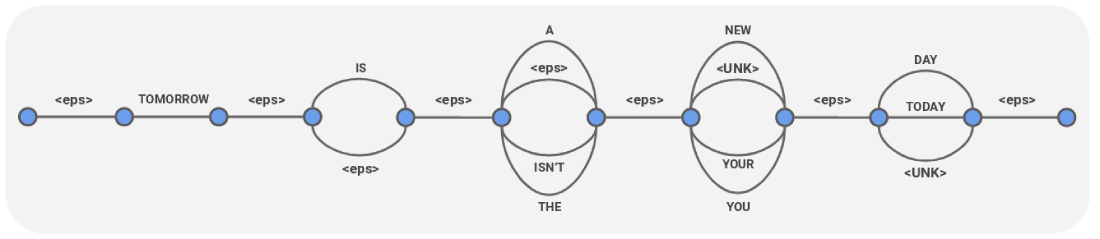
Note that <eps> in this representation is silence.
{
  "cnet": {
    "links": [
      {
        "duration": "1.350s",
        "arcs": [
          {
            "word": "<eps>",
            "confidence": 1.0
          }
        ],
        "startTime": "0s"
      },
      {
        "duration": "0.690s",
        "arcs": [
          {
            "word": "TOMORROW",
            "confidence": 1.0
          }
        ],
        "startTime": "1.350s"
      },
      {
        "duration": "0.080s",
        "arcs": [
          {
            "word": "<eps>",
            "confidence": 1.0
          }
        ],
        "startTime": "2.040s"
      },
      {
        "duration": "0.168s",
        "arcs": [
          {
            "word": "IS",
            "confidence": 0.892
          },
          {
            "word": "<eps>",
            "confidence": 0.108
          }
        ],
        "startTime": "2.120s"
      },
      {
        "duration": "0.010s",
        "arcs": [
          {
            "word": "<eps>",
            "confidence": 1.0
          }
        ],
        "startTime": "2.288s"
      },
      {
        "duration": "0.093s",
        "arcs": [
          {
            "word": "A",
            "confidence": 0.620
          },
          {
            "word": "<eps>",
            "confidence": 0.233
          },
          {
            "word": "ISN'T",
            "confidence": 0.108
          },
          {
            "word": "THE",
            "confidence": 0.039
          }
        ],
        "startTime": "2.298s"
      },
      {
        "duration": "0.005s",
        "arcs": [
          {
            "word": "<eps>",
            "confidence": 1.0
          }
        ],
        "startTime": "2.391s"
      },
      {
        "duration": "0.273s",
        "arcs": [
          {
            "word": "NEW",
            "confidence": 0.661
          },
          {
            "word": "<UNK>",
            "confidence": 0.129
          },
          {
            "word": "YOUR",
            "confidence": 0.107
          },
          {
            "word": "YOU",
            "confidence": 0.102
          }
        ],
        "startTime": "2.396s"
      },
      {
        "duration": "0s",
        "arcs": [
          {
            "word": "<eps>",
            "confidence": 1.0
          }
        ],
        "startTime": "2.670s"
      },
      {
        "duration": "0.420s",
        "arcs": [
          {
            "word": "DAY",
            "confidence": 0.954
          },
          {
            "word": "TODAY",
            "confidence": 0.044
          },
          {
            "word": "<UNK>",
            "confidence": 0.002
          }
        ],
        "startTime": "2.670s"
      },
      {
        "duration": "0.270s",
        "arcs": [
          {
            "word": "<eps>",
            "confidence": 1.0
          }
        ],
        "startTime": "3.090s"
      }
    ]
  }
}
Many speech recognition systems typically output raw words exactly as spoken, without any formatting which can improve intelligibility. Cobalt Transcribe’s customizable formatting suite enables a variety of intelligent formatting options:
How to get a Transcribe Server running on your system
How to use our prebuilt client application to test Cobalt Transcribe.
Gives instructions about how to generate an SDK for your project from the proto API definition.
Describes how to connect to a running Cobalt Transcribe server instance.
Describes how to stream audio to Transcribe server.
Describes how to configure requests to Transcribe server.
Describes how to provide context information for aiding speech recognition.
Differences between gen-1 and gen-2 models, and choosing the right model type
Detailed reference for API requests and types.
Answers to Frequently Asked Questions.